

















One Sequence Walletfor your entire Web3 world.

Bring your accounts, assets and Web3 apps into one desktop wallet. See one portfolio, pay and swap across EVM networks, and let Sequence handle the route.

Available for Windows, macOS and Linux

  • Manage every wallet in one place

    Connect Sequence Smart Wallets, external wallets, hardware signers and watch-only accounts.

  • See one portfolio across EVM networks

    Track tokens, DeFi positions and activity across every supported network.

  • Pay, swap and use apps across chains

    Choose what to send and where it should arrive. Sequence handles the swaps, bridges and fees.

  • Review every transaction and permission

    Check balance changes, fees and permissions before signing. Review sessions and approvals whenever you need to.

Built on Sequence smart account infrastructure

Ethereum
Base
Arbitrum
Optimism
Polygon
Avalanche
BNB Chain
Gnosis
Linea
Scroll
zkSync Era
Mantle
Blast
Celo
Sonic
Fantom
Metis
Manta Pacific
Ronin
Sei
HyperEVM
Monad
Moonbeam
Moonriver
Aurora
Cronos
Kava EVM
Rootstock
opBNB
Polygon zkEVM
Boba
Harmony
IoTeX
KCC
Ethereum Classic
Evmos
01

Cross-chain portfolio

See every wallet and EVM asset in one portfolio.

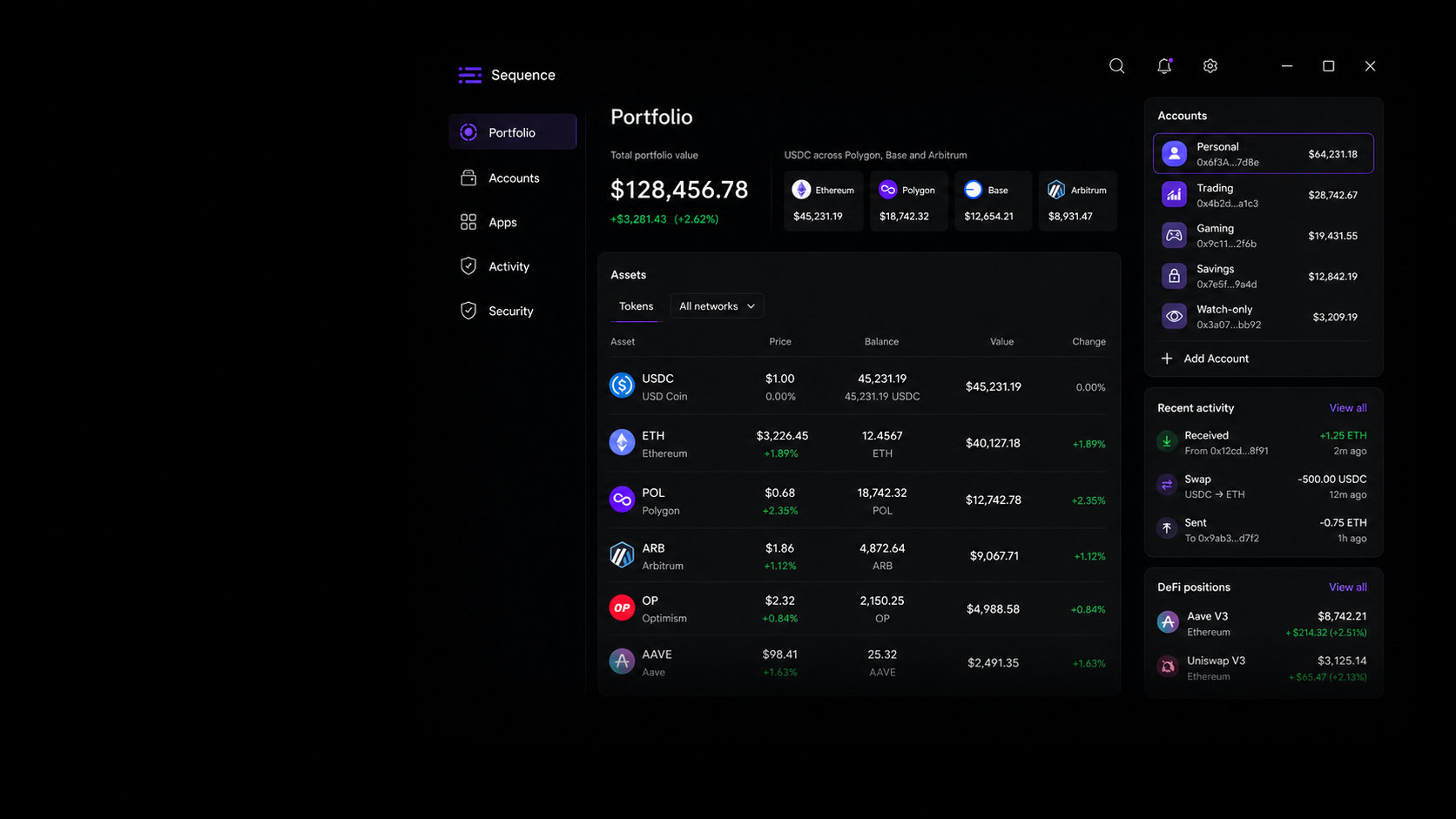
See tokens, DeFi positions and recent activity from every connected account across supported EVM networks. Assets are grouped by token, not split into separate chain balances.

  • Connected wallets
  • Supported EVM networks
  • Token and DeFi balances
Sequence Wallet Desktop portfolio showing assets across connected accounts and EVM networks
02

Multi-wallet management

Your wallets, accounts and signers. One desktop app.

Connect Sequence Smart Wallets, external EVM wallets, hardware signers and watch-only accounts. Give personal, trading, gaming and savings accounts clear roles.

  • Sequence Smart Wallet
  • External EVM wallets
  • Hardware signers
03

Cross-chain payments

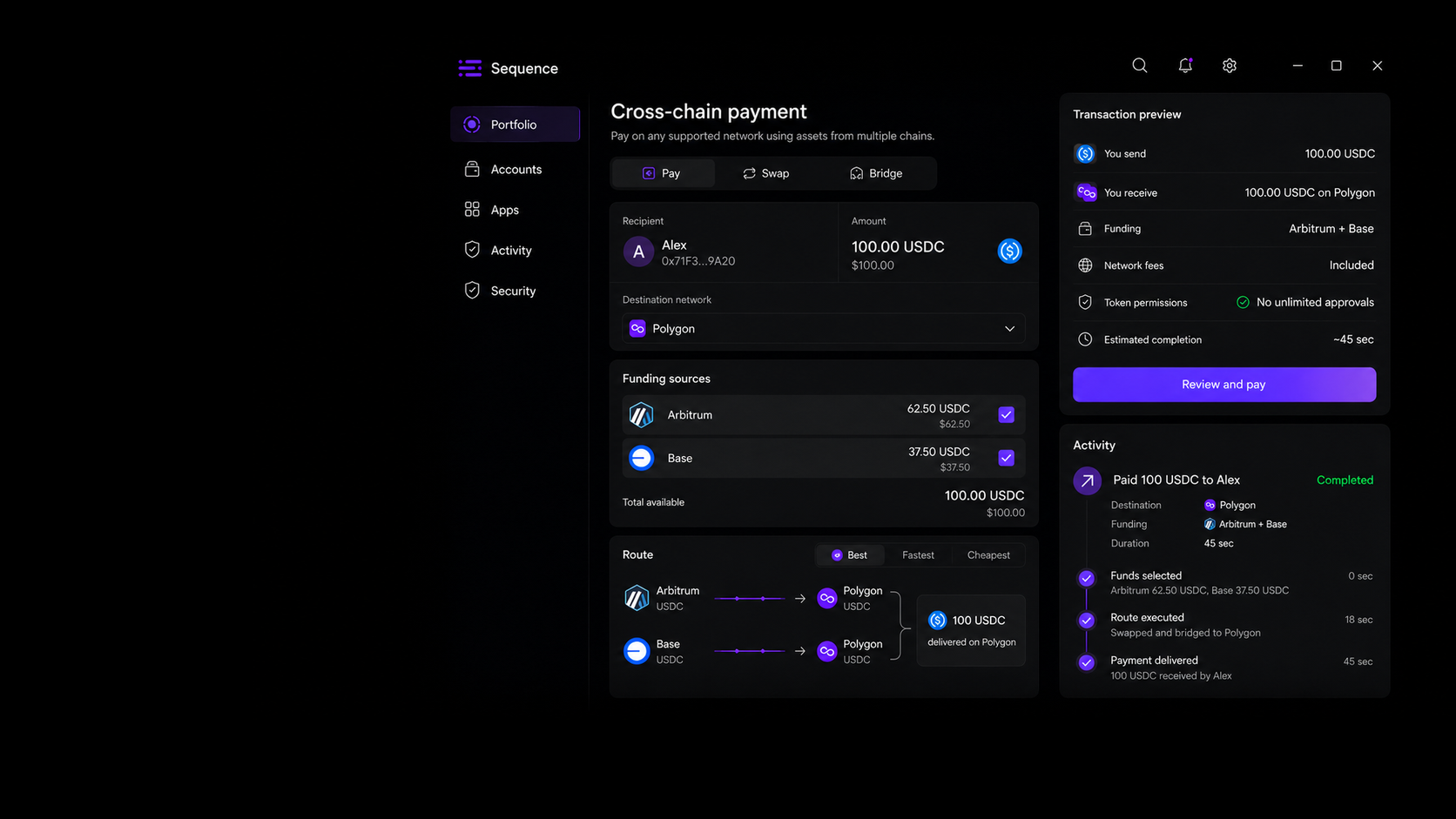
Pay across EVM networks with the assets you already have.

Enter the recipient, amount, token and destination network. Sequence checks your balances and builds the swap and bridge route, including fees, before you confirm.

  • Supported destinations
  • Automatic swaps and bridges
  • One confirmation
Sequence Wallet Desktop cross-chain payment route funded from Arbitrum and Base
04

Transaction preview

See every balance change, fee and permission before you sign.

Know what will leave your wallet and what should arrive. Check the destination network, fees and token permissions before you sign.

  • Balance changes
  • Network fees
  • Token permissions
05

Cross-chain activity

Follow a cross-chain payment from start to finish.

A cross-chain payment may use several swaps, bridges and network transactions. Sequence keeps them together in one activity entry with a clear status and final result.

  • Live status
  • Complete route
  • Final result
06

Sequence Wallet security

Control devices, sessions and approvals in one Security Center.

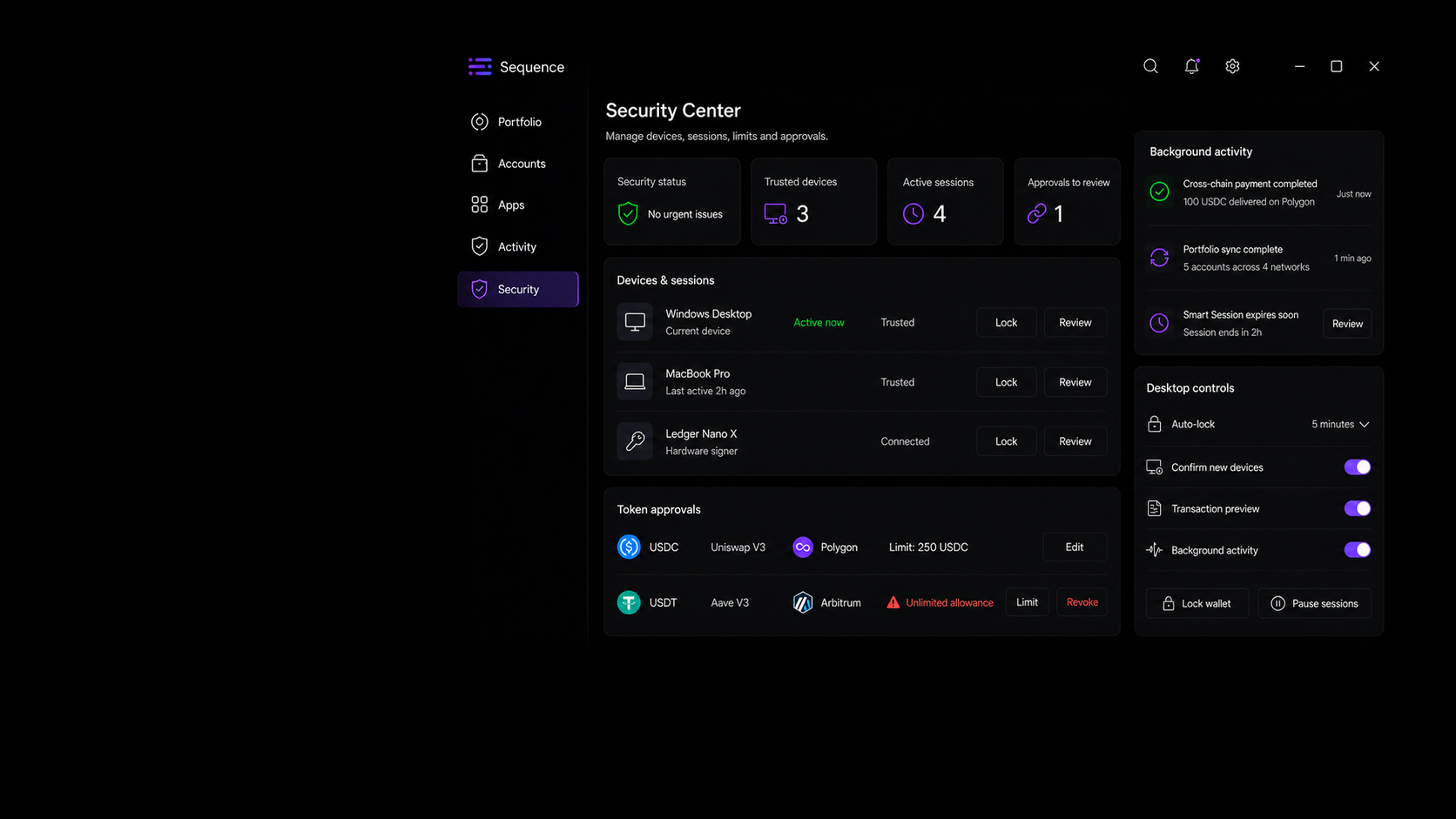
Trusted devices, Smart Sessions, spending limits and token approvals live in one place. Change limits, pause access or revoke permissions whenever you need to.

  • Trusted devices
  • Smart Sessions
  • Token approvals
Sequence Wallet Desktop Security Center with devices, sessions and token approvals
07

Web3 command center

Web3 stays open when your browser closes.

Keep cross-chain activity moving in the background. Get desktop notifications and open any account without digging through browser tabs.

  • Windows
  • macOS
  • Linux

Web3 Apps & Smart Sessions

Use Web3 apps without handing over your wallet.

Smart Sessions keep app access specific. Pick the account, network, actions, spending limit and duration. Review every active session from Sequence Wallet Desktop.

  1. 01

    Choose the right account

    Pick the account and EVM network you want to use.

  2. 02

    Approve specific actions

    Limit access to the actions the app actually needs.

  3. 03

    Set clear limits

    Define a spending cap and how long the session stays active.

  4. 04

    Stay in control

    Review, edit, pause or revoke access at any time.

Download Sequence Wallet

Stop managing chains. Start using Web3.

Get Sequence Wallet Desktop for Windows, macOS or Linux. Keep your accounts, assets, apps and cross-chain activity in one focused workspace.

Available
Stable release · v2.14.6

macOS

macOS 12+ · Apple silicon and Intel

Download for macOS

FAQ

Sequence Wallet Desktop, explained.

01What is Sequence Wallet Desktop?

Sequence Wallet Desktop is a cross-chain crypto wallet for Windows, macOS and Linux. It brings your accounts, tokens, DeFi positions, Web3 apps and transaction controls into one focused desktop workspace.

02Can I use my existing wallets and accounts?

Yes. You can use Sequence Smart Wallets alongside supported external wallets and hardware signers. Each account stays separate, while your balances and activity remain visible in one portfolio.

03Which blockchain networks does Sequence Wallet support?

Sequence Wallet Desktop works across the supported EVM networks available in the app. The network selector and transaction preview show which chains are involved before you approve an action.

04How do cross-chain payments and swaps work?

Choose the asset and destination network. Sequence prepares a route using your available balances, swaps and bridges, then shows the expected result, fees and required permissions before you confirm.

05What can I review before signing?

The transaction preview shows the source and destination assets, networks, route, estimated fees and any token permissions created by the action. You decide whether to continue.

06How do Smart Sessions work with Web3 apps?

A Smart Session limits an app to the account, network, actions, spending cap and duration you approve. You can review, pause, edit or revoke active sessions from Sequence Wallet Desktop.

07Can I manage devices, sessions and token approvals?

Yes. The Security Center keeps trusted devices, active sessions and token approvals in one place, so you can review access and revoke permissions when they are no longer needed.

08Which desktop platforms are available?

Sequence Wallet Desktop is available for Windows, macOS and Linux. Choose the installer for your operating system in the download section above.

09Are blockchain transactions reversible?

Usually not. Check the recipient, network, assets, route, fees and permissions before signing. Confirmed blockchain transactions and third-party app activity may be irreversible.